Alight Motion Free vs Pro: Full Comparison
Choosing between Alight Motion’s free version and its Pro subscription is a common decision point for creators looking to maximize their video editing capabilities. This comprehensive comparison breaks down the differences between both versions, helping you decide which option best suits your editing needs and budget.
Overview of Alight Motion’s Pricing Model
Alight Motion follows a freemium model, offering a robust free version with core editing features, while reserving certain premium assets, effects, and export options for Pro subscribers. Understanding what each tier offers is essential for creators trying to determine whether upgrading is worth the investment.
What’s Included in the Free Version
The free version of Alight Motion is surprisingly generous compared to many competing apps. It includes:
Core Editing Tools
Users get full access to the layer-based editing system, keyframe animation, and basic effects library. This means even free users can create sophisticated animations and edits without any functional limitations on the core toolset.
Basic Export Options
Free users can export videos at standard resolutions suitable for most social media platforms, though certain advanced export settings may be restricted.
Standard Effects and Transitions
A solid selection of effects, blending modes, and transitions are available without a subscription, giving beginners plenty of room to experiment and grow their skills.
What’s Included in the Pro Version
Upgrading to Pro unlocks additional features designed for creators who want more creative flexibility and professional-grade output:
Expanded Asset Library
Pro subscribers gain access to an expanded library of premium fonts, stickers, effects, and animated elements that aren’t available in the free version.
Advanced Export Settings
Pro users often benefit from higher bitrate export options and additional resolution choices, allowing for crisper, higher-quality final videos.
Watermark Removal
Depending on the version and region, some export options in the free tier may include a small watermark, which is removed for Pro subscribers.
Priority Support and Cloud Features
Pro subscriptions may also include enhanced cloud backup options and priority customer support for troubleshooting issues.
Performance Differences
Functionally, both versions perform identically in terms of editing speed, rendering, and app stability. The differences lie primarily in available assets and export flexibility rather than core performance, meaning free users won’t experience slower editing simply because they haven’t subscribed to Pro.
Who Should Use the Free Version?
The free version is ideal for:
- Beginners who are still learning the basics of video editing and want to explore Alight Motion’s features without financial commitment.
- Casual creators who post occasionally and don’t require premium assets or advanced export settings.
- Students and hobbyists experimenting with animation and video editing as a creative outlet rather than a professional pursuit.
Who Should Consider Upgrading to Pro?
Pro is best suited for:
- Professional content creators who publish regularly and need access to premium assets to maintain a consistent, polished brand aesthetic.
- Business and marketing teams producing promotional content that requires the highest possible export quality.
- Creators focused on monetization who benefit from watermark-free exports and expanded creative tools to stand out from competitors.
Cost Considerations
When evaluating whether to upgrade, consider how frequently you create content and whether premium assets would meaningfully improve your output. For occasional users, the free version often provides more than enough functionality. For serious creators generating regular income from their content, the Pro subscription can quickly pay for itself through improved production value and time saved searching for free alternatives to premium assets.
Feature Comparison Table
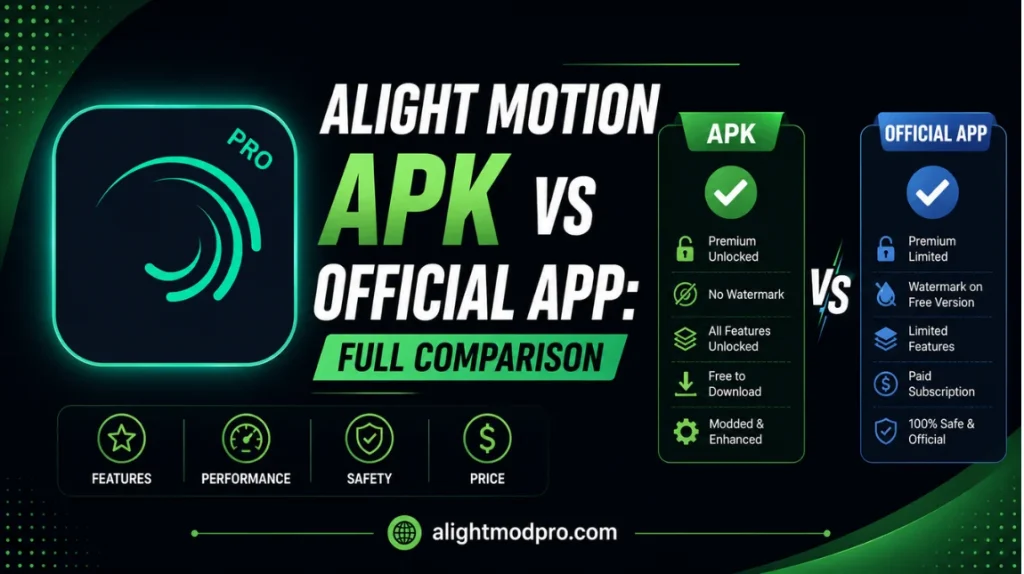
| Feature | Free Version | Pro Version |
|---|---|---|
| Layer-based editing | Yes | Yes |
| Keyframe animation | Yes | Yes |
| Basic effects & transitions | Yes | Yes |
| Premium fonts & stickers | Limited | Expanded |
| Export watermark | May apply | Removed |
| Advanced export settings | Limited | Full access |
| Cloud backup | Basic | Enhanced |
| Priority support | No | Yes |
Making the Right Choice for Your Workflow
Ultimately, the decision between free and Pro comes down to your specific creative needs and how often you use the app. Many creators start with the free version to build their skills and gradually upgrade to Pro once they identify specific premium features that would enhance their workflow.
It’s also worth periodically reassessing your subscription as your content creation needs evolve. A hobbyist who becomes a full-time creator may find that Pro features become increasingly valuable as their audience and production standards grow.
Tips for Maximizing the Free Version
If you choose to stick with the free version, there are ways to maximize your creative output:
- Explore community-shared presets and templates that don’t require premium assets.
- Focus on mastering keyframe animation and layer techniques, which are available to all users regardless of subscription status.
- Use external tools for fonts or graphics that can be imported into your free Alight Motion projects.
Tips for Getting the Most from Pro
For Pro subscribers, make sure you’re fully utilizing your investment:
- Regularly explore new premium assets added to the library, as these are updated periodically.
- Experiment with higher export settings to ensure your final videos showcase the best possible quality.
- Take advantage of priority support if you encounter any technical issues during your editing process.
How Alight Motion’s Model Compares to Other Editing Apps
When evaluating whether Alight Motion’s free-to-Pro structure is worthwhile, it helps to compare it against other popular mobile editing apps. Many competitors either lock core editing tools like keyframe animation entirely behind a paywall or offer a heavily limited free trial period rather than a permanently free tier. Alight Motion’s approach of keeping the full editing engine available for free, while reserving only premium assets and export enhancements for Pro, is considered relatively generous within the mobile editing space.
This structure means that even long-term free users can continue producing professional-quality content indefinitely, which is a significant advantage for creators who are budget-conscious but still want access to advanced animation tools.
Real-World Scenarios: Free vs Pro in Practice
To better understand the practical differences, consider a few real-world creator scenarios:
The Student Creator
A student making occasional edits for personal social media accounts likely has no pressing need for premium fonts or watermark removal. The free version comfortably supports their creative goals without any financial commitment.
The Growing Influencer
A creator building an audience on Instagram or TikTok may start noticing that competitors use unique fonts, stickers, or watermark-free exports that make their content look more polished. At this stage, upgrading to Pro can provide a meaningful boost in perceived production quality.
The Business or Agency User
A marketing team producing client-facing video content typically requires the highest possible export quality and a professional appearance free of any watermarks. For these users, Pro isn’t just a nice-to-have — it’s often a practical necessity for maintaining brand credibility.
Evaluating the Long-Term Value of a Pro Subscription
When deciding whether to commit to a Pro subscription, it’s worth thinking beyond the immediate feature list and considering long-term value. Subscription costs add up over time, so creators should evaluate how frequently they’ll actually use premium assets and advanced export settings. A useful approach is to track your editing habits for a month using the free version, noting any moments where you wished you had access to a premium font, sticker, or export setting. If these moments occur frequently, a Pro subscription is likely to pay for itself in improved efficiency and content quality.
How Updates Affect Both Versions
Alight Motion regularly rolls out updates that can affect both free and Pro users. New effects, performance improvements, and bug fixes are typically made available to all users regardless of subscription status, while entirely new premium assets are usually reserved for Pro subscribers. Staying updated ensures you have access to the latest stability improvements and feature additions, regardless of which version you use.
Switching Between Free and Pro
One advantage of Alight Motion’s subscription model is the flexibility to switch between free and Pro as your needs change. If you subscribe to Pro for a specific project requiring premium assets, you can typically cancel afterward and continue using the app’s core features for free. However, be aware that any premium assets used in a project may become unavailable or require re-subscription if you wish to edit that project again in the future, so plan your subscription timing around your active project needs.
Common Questions About Upgrading
The Psychology Behind Freemium Editing Apps
Understanding why apps like Alight Motion use a freemium model can help creators make more informed decisions about upgrading. By offering a fully capable free tier, the app builds a large user base of creators who become skilled with the platform’s core tools. As these creators grow their audiences and production standards, premium features become increasingly attractive as a way to differentiate their content, creating a natural, low-pressure upgrade path rather than forcing users into a paywall from day one.
This approach benefits both the developer, who builds a loyal long-term user base, and creators, who can test the platform thoroughly before committing financially.
Regional Pricing and Availability Considerations
Subscription pricing for Pro can vary depending on your region and the app store platform you’re using. It’s worth checking current pricing directly within the app or app store listing, as promotional discounts or regional pricing adjustments are sometimes available. Annual subscriptions often provide better value compared to monthly billing for creators who know they’ll be using premium features consistently over time.
Team and Multi-Device Considerations
For creators working as part of a team, or those who edit across multiple personal devices, it’s worth understanding how Pro subscriptions apply across devices. Typically, a Pro subscription is tied to the account used for purchase and can be accessed across devices logged into that same account, though specific policies should be confirmed within the app’s subscription settings, as they can be updated over time.
Making an Informed Decision Checklist
Before deciding between free and Pro, consider running through this quick checklist:
- Do you publish content regularly enough to benefit from premium assets?
- Would watermark-free exports meaningfully improve your content’s professional appearance?
- Do you have a specific project requiring premium fonts, stickers, or export settings?
- Is your budget better suited to a one-time investment or an ongoing subscription?
- Have you fully explored the free version’s capabilities before assuming you need to upgrade?
Answering these questions honestly will help clarify whether the free version continues to serve your needs or whether Pro offers tangible value for your specific content goals.
Conclusion
Both the free and Pro versions of Alight Motion offer powerful editing capabilities suitable for a wide range of creators. The free version provides an excellent foundation for beginners and casual users, while Pro unlocks additional assets and export flexibility valuable for professional and monetized content creation.
Understanding your own content creation goals and frequency of use is the key factor in deciding which version is right for you. Whichever you choose, Alight Motion remains one of the most capable mobile editing platforms available, offering a genuine path from beginner to professional-level video production.